.png)
Using CycliqPlus EdgeUpdated 3 months ago
Garmin changed the way data fields start. For the best CycliqPlus Edge experience, tap your ride profile as soon as your Garmin turns on so your cameras connect quickly.

Once set up, just turn on your Garmin and start riding. When connected, you can:
On both devices at once:
- View status at a glance — Live battery for each device and the current light mode (e.g., Organic, Camera Only, Flash High).
- Lock footage — Secure the current recording during an incident so it isn’t overwritten.
- Take a snapshot — Capture a still mid-ride without touching your camera.

After selecting a device:
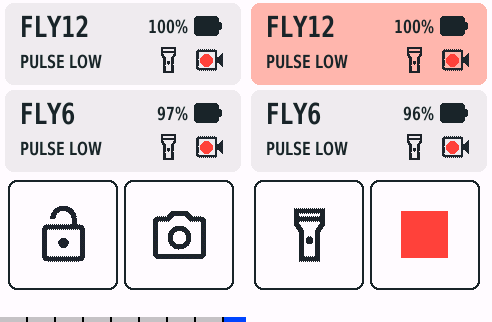
- Change light modes* — Light up your way, or turn your lights off to conserve power.

- Start/Stop recording* — Manual control when you need it.

- Power devices on/off* — From the bars, without handling the camera.
*To use these controls, first tap on the device you want to control, then use the buttons.
Tips
- Keep the data field on its own page for the clearest controls.
- If a device disconnects, it will attempt to reconnect automatically when back in range if you tap on the disconnected device.
- Use actions only when it’s safe to do so. Keep your eyes up and hands steady.
- You may need to configure your devices to ensure auto start up and shut down are working. Read more here